
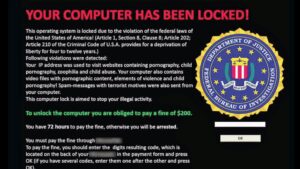
Ransomware does not announce itself politely. One morning your accounting files refuse to open, every document has a new extension you have never seen, and a note on the screen demands a payment for the key that unlocks them. It is a stressful moment, and the decisions you make in the first hour decide much of what a recovery specialist can do later. Here is what to do when files get encrypted — and the mistakes that quietly turn a recoverable situation into a permanent loss.
What Ransomware Actually Does
Ransomware is a particularly vicious form of malware. It takes over your computer by encrypting your own files, then threatens you with the loss of your data while demanding a ransom in exchange for a promise — nothing more than a promise — that access will be restored once you pay. Victims are usually shown instructions on how to make the payment, and the clock starts ticking from that moment.
Encryption does not always stop at one machine. If the infected computer can reach shared network drives, external backup drives, or cloud-synced folders, those copies can be scrambled too. That is why the very first move matters so much.
First Steps: The First Hour Is Everything
1. Disconnect, do not panic
The moment a ransom note appears, disconnect the machine from the network. Unplug the Ethernet cable or switch off Wi-Fi. This stops the encryption from spreading to shared drives and other computers while you take stock. Leave the computer itself powered on unless a specialist tells you otherwise — some recovery approaches need the original state of the machine preserved.
2. Do not contact the attackers
The guidance on our ransomware case page is blunt, and it is worth repeating: do not contact the hackers. Nothing about the exchange is guaranteed. Payment might bring a working key, a broken one, or none at all, and every conversation hands the criminals information they can use against you. Treat the ransom note as evidence, not as an invitation.
3. Preserve everything as you found it
Take clear photos of the ransom note, any file extensions that changed, and any error messages. Then stop. Do not rename folders, do not delete what looks corrupted, and do not attempt a fresh install or a drive reformat on the affected machine. Wiping the drive destroys exactly the material a decryption specialist needs to identify the strain and evaluate your options.
4. Check for a clean backup
The surest path back to your files is a restore from a clean, recent backup — which is why our own case guidance recommends trying that first. Verify the backup is intact and completely disconnected from the infected system before you rely on it. A backup drive that was mapped to the network during the attack may itself be encrypted, so check it before you overwrite anything with bad copies.
5. Open a recovery case
If no usable backup exists, professional decryption is the remaining path. You can open a ransomware case online, and a specialist will follow up to discuss the specifics of your situation. Cases are handled individually, because the right approach depends on which strain encrypted your files and how much of the original data survived.
Mistakes That Make Recovery Harder
Beyond the first-hour steps above, a few errors show up again and again:
- Running random “free decryptor” tools. Decryption tools are specific to individual ransomware families. Using the wrong one on encrypted files can corrupt the data for good, even for a specialist.
- Wiping or reinstalling right away. It feels decisive, but it removes the encrypted originals and the ransom note — the evidence that identifies your attacker’s toolkit.
- Waiting weeks to act. Encrypted originals should be preserved intact and evaluated promptly. The longer a damaged system stays in service, the more secondary problems pile up on top of the original encryption.
- Paying without exploring recovery first. There is no guarantee of a working key, and funding the operation marks your business as a payer for future attacks.
How Professional Ransomware Recovery Works
Identification comes first. Specialists use the ransom note and the structure of the encrypted files to determine which ransomware strain and version hit your systems, because decryption options depend entirely on that identification. Next comes a case-by-case assessment: whether a clean backup can be restored, whether a known decryption path exists for the strain, and what shape the encrypted data is in.
Then the recovery work happens. For some cases, files are restored from backup and the systems are cleaned. For others, encrypted files are worked on in a lab setting to extract and validate what can be recovered. Throughout the process, the encrypted originals stay preserved until the recovered data has been checked.
Networks Long Island Data Recovery helps businesses across Long Island and the five boroughs, including Nassau, Suffolk, Queens, Brooklyn, the Bronx, Manhattan, and Staten Island, remove ransomware and restore encrypted files. Every case starts the same way: preserve the scene, open the case, and get a specialist involved early.
Make the Next Attack a Non-Event
The best time to prepare for ransomware is before you ever see a ransom note. A few habits do most of the work:
- Keep at least one backup offline or otherwise unreachable from your everyday network.
- Install operating system and software updates promptly; updates close the holes ransomware walks through.
- Treat unexpected attachments and links with suspicion, especially anything urging urgency.
- Limit who can write to shared drives, and disconnect backup drives after they finish their schedule.
Facing a ransom note right now? Networks Long Island Data Recovery operates a dedicated ransomware response team, with emergency service available at 516-889-0777. Open a ransomware case to have a specialist follow up on your situation, or reach us any time through our contact page. The earlier you get the encrypted originals looked at, the more of your data can typically be saved.